
LiveManager
Your live YouTube channel under control, without anyone having to keep watching it.
Many radio and TV stations stream their programming live on YouTube. To do so, they use automated broadcast systems that send the signal to YouTube and run the program schedule at the set times. When something goes off plan — a broadcast is not created on YouTube, the video signal does not arrive or a show starts outside its scheduled time —, the first to notice is almost always the viewer.
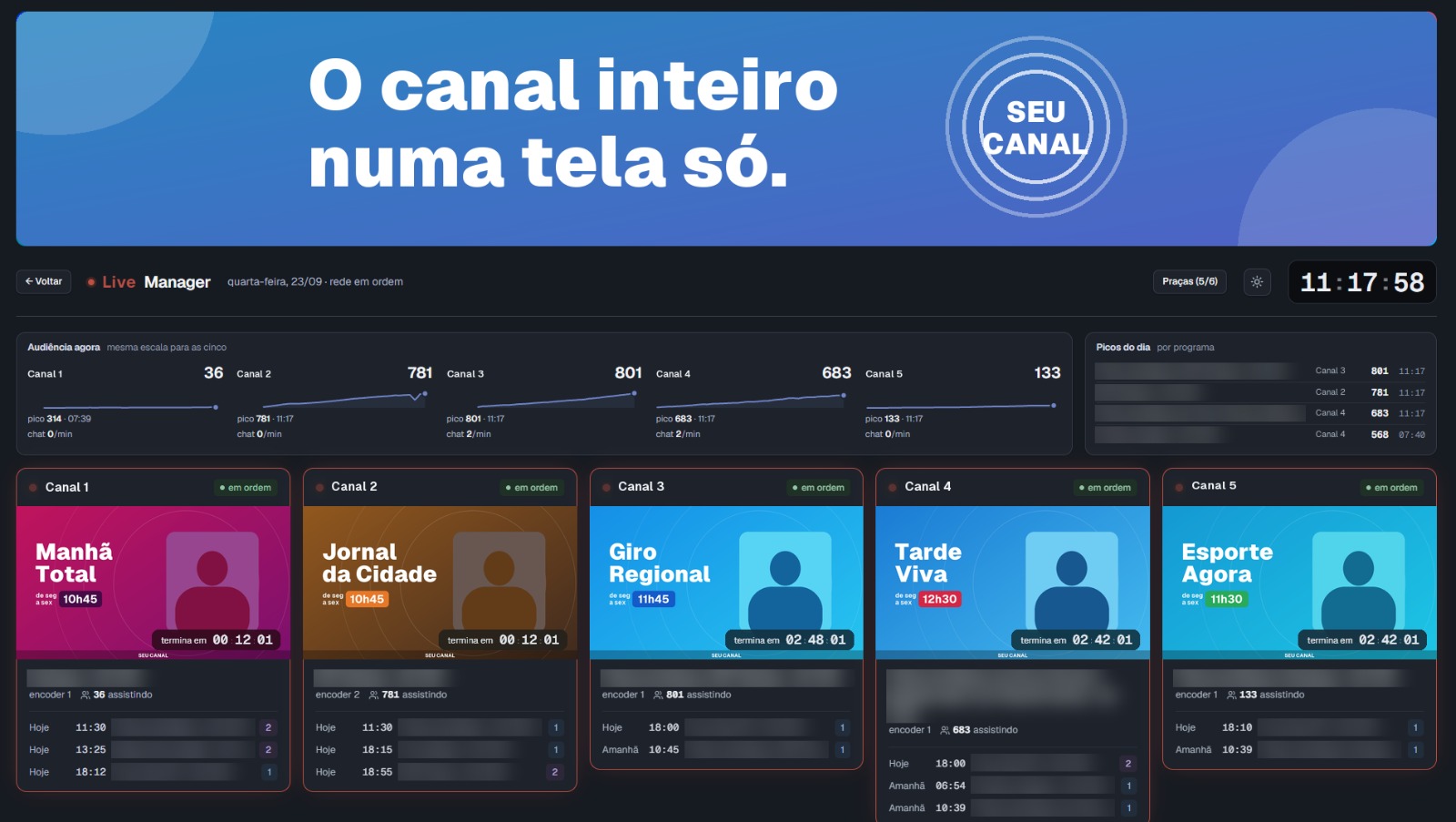
Live Manager monitors the whole operation automatically, 24 hours a day. If anything goes off plan, it alerts the team by phone before the audience notices. The platform also lets you adjust times and create broadcasts right from the browser, from anywhere, as well as follow the audience of each show and receive weekly reports.
With the optional analysis module, Live Manager goes beyond monitoring: it transcribes what is said on the shows and identifies every time an advertiser's brand appears on screen, recording images and exposure time. It also estimates what that exposure would be worth if it had been bought as paid advertising.
What usually goes wrong today
Tomorrow's broadcast was not created on YouTube, and nobody noticed until showtime.
The show started, but the video never reached YouTube. The one who raised the alarm was a viewer, in the comments.
To change a show's time, someone had to go to the station's computer.
The advertiser asked how many people watched the show, and nobody could answer.
What Live Manager does
Watches
Checks on its own, every minute, more than 40 situations that can take a show off the air.
Alerts
When something serious happens, it sends a message to the team's phones, via Telegram or WhatsApp.
Works remotely
Times and broadcasts are changed from the browser, from anywhere. Everything is logged.
Measures audience
How many people watched, minute by minute, and a report that arrives every week.
Analyzes optional
Writes down what was said and finds advertisers' brands on screen.
How it works
Nothing changes in the way the station broadcasts. Live Manager sits alongside, watching and organizing.
- 1
The encoder sends the show's video straight to YouTube, as it always has.
- 2
A small program installed on the encoder computer, the agent, tells Live Manager what the schedule is and what is happening. It only connects from the inside out: there is no need to open the station's network.
- 3
Live Manager compares the schedule with what is on YouTube and alerts the team when something doesn't match.
- 4
The team follows and operates everything from the browser, on a computer or phone.
If Live Manager stops, the broadcast goes on. The video doesn't go through it: the show keeps flowing from the encoder to YouTube as usual.
A day with Live Manager
A daily show, from 11:30 a.m. to 1:00 p.m., on Channel 2. This is what Live Manager does for it, without anyone asking:
-
The day before
Checks that tomorrow's live already exists
The broadcast is usually created on YouTube the day before. If it wasn't, the team is alerted in time to fix it.
-
Before the show
Checks that everything matches
Will the encoder start at the same time YouTube announced to the audience? Is the stream key ready? Are the thumbnail and description in place? If something doesn't match, it shows up on screen, with the explanation.
-
11:30 a.m.
Checks that the show went on air
Did the encoder start? Did the video reach YouTube? Is the live on air for the audience?
-
11:35 a.m., if it went wrong
Alerts by phone
A serious problem that lasts 5 minutes becomes a message in the on-call group:
While the problem lasts, a reminder every 30 minutes. When it is resolved, a notice that things are back to normal.
-
During the show
Measures the audience
Counts, every minute, how many people are watching. Follows the chat: how many messages arrive, the moments when the audience gets excited and what they were talking about.
-
1:00 p.m.
Closes what was left open
If the encoder ended the show but the live stayed open on YouTube, Live Manager ends it on its own.
-
Every week
Sends the report
The week's audience report, in PDF, arrives in the chosen Telegram group, on the agreed day and time.
The alerts
More than 40 checks, repeated every minute. Serious problems that last 5 minutes become a phone message, via Telegram or WhatsApp; the others stay on screen. Some examples:
| If this happens… | …Live Manager |
|---|---|
| The video didn't reach YouTube at showtime | alerts on screen and, if it lasts 5 minutes, on the on-call phone. |
| The encoder will start at a different time from the one announced to the audience | shows the difference and where to fix it. |
| Tomorrow's live hasn't been created on YouTube yet | alerts in time to create it. |
| A show has no stream key | alerts before showtime. |
| The encoder finished, but the live stayed open on YouTube | ends the live on its own. |
| The encoder computer lost contact | alerts; and, if the station has a backup computer, warns that it needs to take over. |
| The encoder computer's clock is off | sets the clock on its own, outside broadcast hours. |
Audience: how many people watched
Minute by minute
How many people are watching each live, every minute, with the average and peak of each show.
The chat
How many messages arrived and from how many people, the moments when the chat sped up and what was being discussed. Also Super Chats (paid messages) and how much they added up to.
Fair comparison
Each show is compared with its own previous editions, together with punctuality: if the live started late, that shows up next to the audience.
Ranking and spreadsheet
The shows with the highest audience, each day's peaks, and all of it in a spreadsheet, for anyone who wants to do their own math.
The weekly report
Every week, in PDF: how many minutes were watched, the average and peak audience, the chat, each show's punctuality, the most watched lives, the days and times with the highest audience and the comparison with the previous week. It arrives on its own in the chosen Telegram group and can also be downloaded at any time.
Everything LiveManager offers
Dashboard and Wall
Follow the whole channel on a single screen: the show on air, the next one, today's schedule and the next 24 hours. The Wall shows everything full screen on the control room TV.
Encoder Schedule
Edit the schedule safely from the browser: every change is checked before saving and can be undone. Create one-off lives and start or end broadcasts with one click.
YouTube Lives
Create the live on the channel and in the schedule at once, with thumbnail and description ready for each show. Replace the on-air live when needed and let the platform handle the ending.
Alerts and Notifications
The platform watches schedule, signal, stream keys, machines and encoders all the time. Critical issues go straight to the on-call team's phone, with reminders until they are resolved.
Audience and Chat
See how many people are watching each minute, audience peaks, Super Chats and the most discussed topics. Compare airings, build rankings and export the data to CSV.
Weekly Report
Get a weekly PDF with watched minutes, average and peak audience, punctuality, most viewed lives and heat map, sent automatically on the day and time you choose.
Content analysis
For those who sell airtime to advertisers: it shows what was said on the shows and proves when each brand appeared on screen.
What was said
The system listens to the show and writes down everything that is said, as it happens. Afterwards, you can search for a word ("promotion") or a topic ("soccer") and jump straight to the moment it was said.
When the brand appeared
You register the advertiser's logo. Every time it appears on screen, the system saves a snapshot of that instant, the time, how long the brand stayed visible and how many people were watching. Each channel has its own list of brands.
The advertiser report
In PDF, with the station's header: every appearance of the brand in the chosen period, with a snapshot of each one.
What else shows up on screen
The system reads the text that appears on screen, recognizes commercial breaks and shows logos that appear often and haven't been registered yet.
What the brand exposure is worth
The media value is how much it would cost to buy, as advertising, the same exposure the brand got. The calculation combines four things:
The result is the maximum reference value. To negotiate with the advertiser, Live Manager also shows the negotiable value, which ranges from 10% to 30% of it (20% by default). The assumptions are visible and can be adjusted.
Technical details
- Runs at the station itself: video never leaves, only text, findings and photos go to the platform
- Live transcription in Portuguese, Spanish or English, with text and topic search powered by local AI
- Brand detection on the live signal, with a photo of each appearance and measured screen time
- Brand reports in PDF with the company header and the audience at that moment
- Media value (EMV) and negotiable value, with assumptions shown and adjustable on screen
- On-screen text (OCR), scene, cut and commercial break monitoring
- Machine protection: analysis pauses on its own and never competes with the encoder for resources
See the LiveManager interface
Want to see LiveManager up close?
Fill out the form and a YoungTech specialist will contact you to schedule a demo.
Talk to a specialist
Want to see LiveManager up close? Talk to a specialist.
Need a solution?
For over 25 years we've delivered automation and management software for broadcasters in Brazil and abroad.